


Slow MySQL queries can significantly affect the performance of your website or application, leading to slow page loads, a bad user experience, and even lower search engine rankings. However, with the right approach, it’s possible to identify and fix slow MySQL queries to improve the overall performance of your database. In this blog, we will explore how to fix slow MySQL queries and speed up your website by optimizing database performance.
Why Do MySQL Queries Become Slow?
MySQL queries can become slow for a variety of reasons. Here are some of the most common causes:
Lack of Indexing: Without proper indexing, MySQL has to scan entire tables to fetch the data, which can make queries very slow.
Complex Queries: Queries involving multiple joins, subqueries, or complex conditions can be computationally expensive, making them slower.
Large Tables: When your tables have a huge number of rows, the database engine might take more time to process the query.
Inefficient Query Design: Queries that are not optimized for performance, such as SELECT * or redundant WHERE clauses, can also contribute to slow performance.
Server Resources: Insufficient server resources, like CPU or RAM, can impact MySQL query speed, especially during peak times.
How to Fix Slow MySQL Queries
1. Use Proper Indexing
Indexes are a fundamental part of optimizing MySQL queries. Without indexes, MySQL needs to scan every row in a table to execute a query. To resolve this, make sure that:
Primary and foreign keys are indexed.
Columns used in
WHERE,ORDER BY, orJOINclauses are indexed.Avoid excessive indexes on columns that are seldom used.
To add an index in MySQL, you can use the CREATE INDEX statement:

2. Optimize Your Queries
Analyzing and optimizing your queries is essential for improving performance. Here are a few techniques:
*Avoid SELECT : Instead, select only the necessary columns.

Use LIMIT when possible: Limit the result set to the necessary number of rows.

Simplify Joins: Avoid using multiple joins when a simpler query can achieve the same result.
3. Analyze and Optimize Slow Queries
MySQL provides the slow query log to identify slow-running queries. Enabling the slow query log helps you track down queries that take too long to execute.
To enable the slow query log, add these lines to your my.cnf or my.ini file:
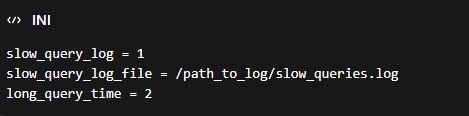
This will log queries that take longer than 2 seconds to execute. Once you have the slow query log, review the queries, and identify the ones that need optimization.
4. Use Query Caching
MySQL query caching can help reduce the load on the server by storing the results of frequently executed queries. When the same query is requested again, the result is fetched from the cache rather than executing the query again.
To enable query caching, add the following lines to your my.cnf file:

However, note that query caching is not recommended for frequently changing data, as it can cause outdated data to be served from the cache.
5. Optimize Your Database Schema
Make sure that your database schema is designed efficiently. For example:
Normalization: Normalize your tables to reduce redundant data and ensure consistency.
Partitioning: Partition large tables to improve performance on specific queries.
Sharding: Split large databases across multiple servers (sharding) to reduce the load on a single database.
6. Review Server Resources
Sometimes, slow queries are a result of inadequate server resources. Consider:
Increasing server RAM and CPU to handle larger workloads.
Upgrading the disk to a faster SSD to reduce I/O latency.
7. Use EXPLAIN to Analyze Query Execution
The EXPLAIN command helps you understand how MySQL executes a query. It shows the query execution plan, including which indexes are being used, and how tables are being joined. This can help identify performance bottlenecks.
For example:

Review the output and make adjustments to the query or indexing based on the results.
8. Optimize the MySQL Configuration
Sometimes, the default MySQL configuration is not optimized for your use case. Review and adjust settings in the my.cnf file, such as:
innodb_buffer_pool_size: This determines how much memory InnoDB will use to cache data. Set it to 60-70% of your server’s available RAM.

key_buffer_size: This is relevant for MyISAM tables, so adjust it based on the storage engine you’re using.
Conclusion
Fixing slow MySQL queries requires a combination of query optimization, indexing, and proper configuration. By following these steps, you can dramatically improve MySQL performance and reduce the time it takes for queries to execute.
Regularly monitor the slow query log, use EXPLAIN to analyze query execution plans, and implement the best practices outlined above. Over time, this will ensure that your database runs efficiently and handles queries swiftly, providing a better experience for your users.